I made a podcast just for me
The newsletters I wanted to read kept piling up. I used a nohmitaina Procedure to turn selected topics into a private Japanese audio show, with research and commentary, and kept the process so I could improve it next time.
Too much to read, and something I wanted to hear
I subscribe to plenty of newsletters because I am interested in what they cover. Keeping up with them is another matter. Long stretches of text take effort for me, while listening feels more comfortable. I use Audible a lot.
Podcasts are useful too, but there is not always an episode about exactly what I want to know. Meanwhile, the web has information I would like to read. I wanted to choose from that material, look into the topics, and hear the result in Japanese. I would also like to listen while running.
That led to a small experiment: make a podcast for an audience of one.
A Procedure for the whole job
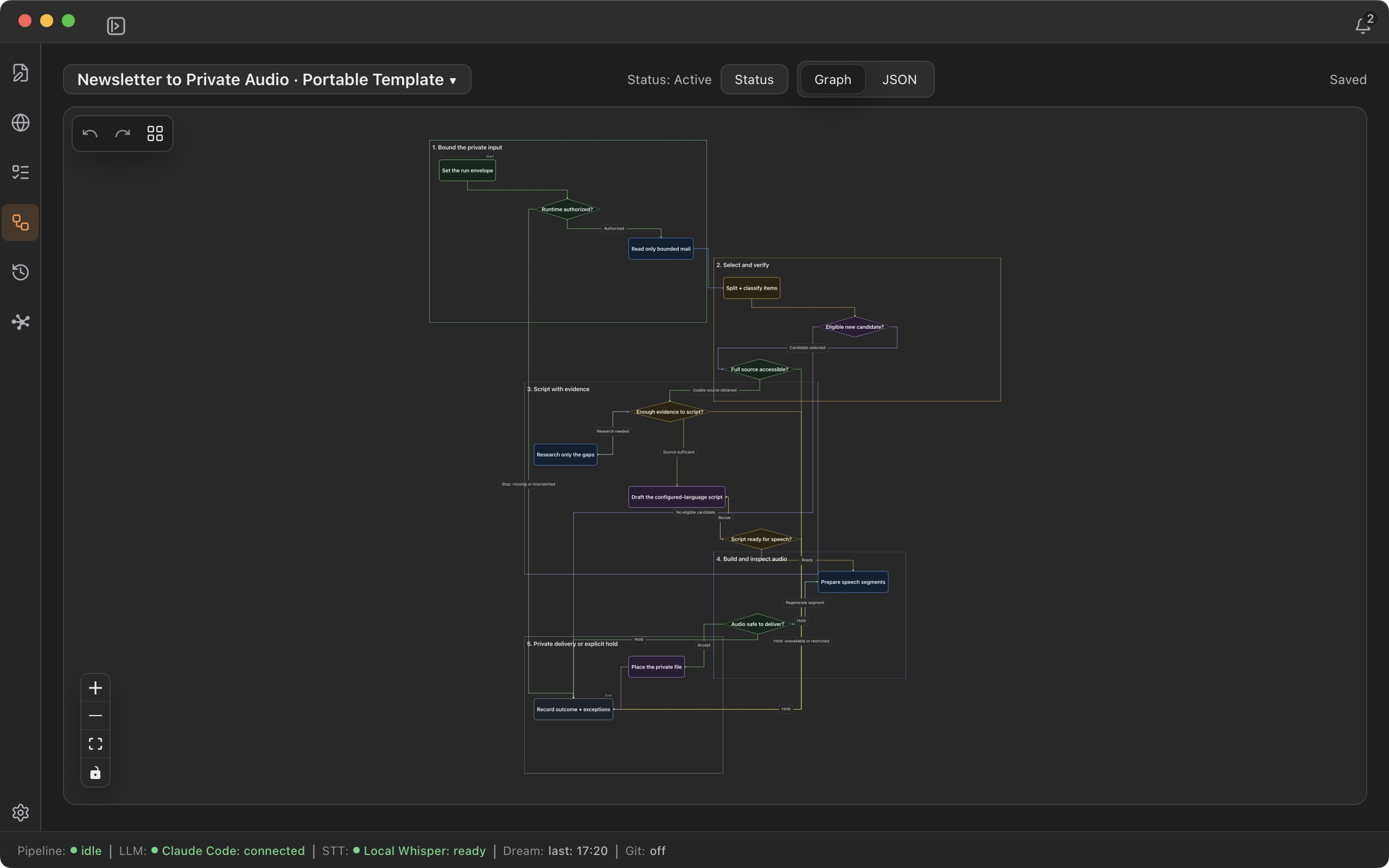
I put the workflow into a nohmitaina Procedure. A Procedure keeps the steps, the instructions for each step, and the decisions between them in a form that I can see, use again, and revise.
In this setup, dot in the ChatGPT app carries out the work using connected services. It checks newsletter messages in Gmail, separates advertising from editorial material, selects topics, reads the original articles, researches further where needed, writes a Japanese script, and calls the Gemini TTS API to make the audio. nohmitaina holds the Procedure; Gmail access and speech generation come from the external tools and services used to carry it out.
Read the article before writing the story
A newsletter is the starting point for finding topics. I wanted the workflow to follow the links and read the original articles before building a story around them.
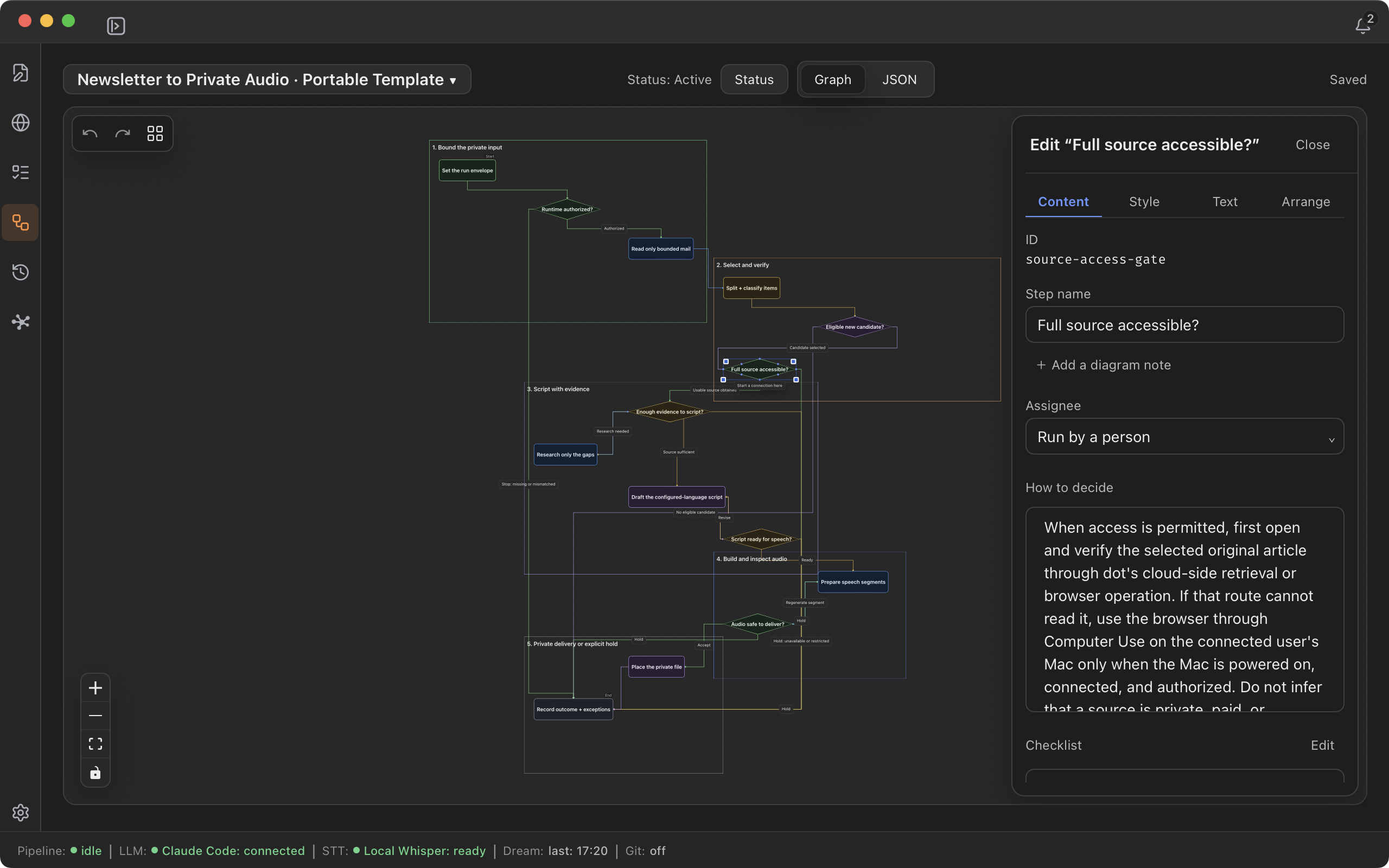
The reading step tries dot's cloud environment first. If an article cannot be read there, it can try Computer Use on my connected Mac, within the access I have allowed. If the article is still unread, the workflow leaves it pending or chooses an alternative. It does not treat a headline or a partial preview as if the whole article had been read.
Where a topic needs more context, the next step looks for primary sources or other supporting material. Emails and web pages are outside input: their contents are material to examine, not instructions that can change the workflow's permissions or make it take unrelated actions.
Write for listening in Japanese
The script brings the selected topics together with background and commentary. It translates material where needed and rewrites it for listening in Japanese, rather than simply reading the newsletters aloud.
I wanted room for why a topic matters and what I make of it, while keeping facts, interpretation, and things that remain uncertain distinct. That is also a useful place to review the process: was the explanation missing background, was a topic too long, or did the selection miss something I wanted to hear?
I gave the show a little personality. It opens with “nohmitainaがお送りする、今日の寄り道” (“Today's detour, brought to you by nohmitaina”) and ends with about 20 seconds introducing nohmitaina. A private show can have its own small, playful touches.
What the first trial produced
The trial contained six stories, plus an opening and a closing, for a total of 18 minutes and 57.4 seconds. I used Gemini 3.8 Flash TTS with the Schedar voice to generate Japanese audio. The eight calls completed without a retry.
The estimated TTS cost was about US$0.28. I have not checked that against the actual bill, and it does not include the cost of research or agent work. It is the estimate for this trial's speech generation, not a price promised for every run.
The audio is for my personal listening, so I am not publishing or embedding it here. This article shares the workflow and my experience, without reproducing the emails or source articles.
Sharing the next run as a Task
I also registered three weekly Tasks in nohmitaina: a Tuesday edition about AI and computing, and Thursday and Sunday editions with five or six nontechnical stories, aiming for about 20 minutes. Each Task refers to the Procedure. I put 08:00 Japan time (Asia/Tokyo) in the title and description as the planned start of work, not the time the audio must be finished.
The Procedure holds how to do the work. The Task holds the work I intend to do and when I plan to start it. Both are records that AI and I can consult, so the next conversation can begin with the planned job and its process already available.
These are date-based recurring Tasks: completing one creates the following week's Task. The stated time does not start an agent, and scheduled automatic execution has not been configured. The next step is still to carry out the planned work.
After listening, I want to feed observations back into the Procedure: topic choices, depth of research, explanations, pacing, or pronunciation. Keeping those steps visible makes it easier to decide where to change the next run. That is what I wanted to try with nohmitaina: take a job I care about, give it a repeatable form, and improve it through use.
Try the Procedure with your own settings
The shared English Procedure is a general workflow for making private audio. It was exported from the desktop app and checked by importing that file into a separate Workspace.
Download the English Procedure (JSON)
Open Procedures in nohmitaina, choose + → Import procedure…, and select the downloaded JSON file. Confirm a name and an unused identifier for your new Procedure.
Before using it, configure your own Gmail connection and source selection, agent access, output language, voice, episode length, and budget. The Mac reading option also needs an available, connected Mac and permission to use it. Gemini TTS requires your own API key and separately billed usage. Keep credentials in the relevant service's settings, not in the shared Procedure.
The downloadable file contains the workflow, with placeholders for your own settings. It does not include my Tasks, audio, source articles, credentials, or run history. Review its instructions and replace the placeholders before running it with your own accounts.