Parts of a long instruction get missed
When a complex task’s sequence, references, and cautions all go into one long instruction, some get missed. You end up asking for small corrections again and again.
Good work needs a process as well as a purpose. nohmitaina is a ‘brain-like’ memory editor: a shared place where you and AI can review your ideas, ways of working, current tasks, and actual results, and build on them over time.
macOS / Windows · Use with Claude Code or Codex CLI
Sometimes, work you ask AI to do doesn’t go the way you expected. Alongside the AI’s capabilities, it’s worth looking at how the work is structured and communicated.
When a complex task’s sequence, references, and cautions all go into one long instruction, some get missed. You end up asking for small corrections again and again.
The sequence differs from what you had in mind, and something you wanted checked first gets left until later.
Without shared background knowledge and context, the work within a step drifts from what you expected.
Too little background information—or too much—makes it harder to see what matters at this point.
Adding more information doesn’t always solve the problem. Break the work into steps, connect each one to the information and decisions it needs, and share that structure. It becomes easier to see where things went off track and improve the next run. Sharing a process alone, however, does not guarantee the quality of the result.
You don’t need a special tool to begin. Choose a task you repeat, and write down answers to five questions.
Need more evidence? Return to research
This much of an overview is enough to start. You can see which step you’re in, where a person needs to decide, and what would send you back to an earlier step.
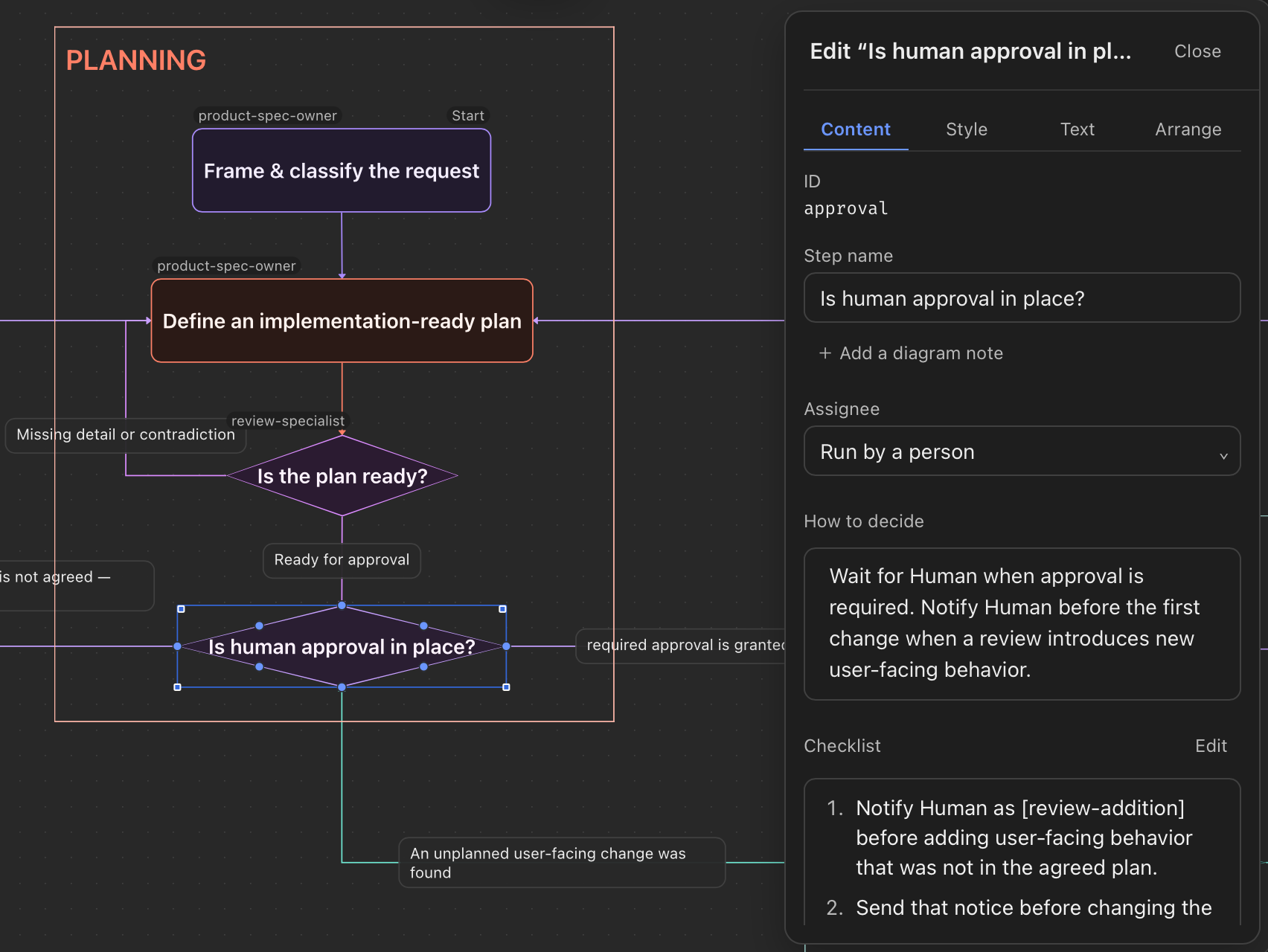
A Procedure in nohmitaina represents work as a diagram of boxes and lines. Each step brings together the conditions needed to do that part of the work.
Take the “Check the evidence” step from section 03
You don’t have to write a complete process on your own before starting. Let AI draft it, adjust the sequence and decision points yourself, then update it again based on what happens in practice. The more often you use a process, the more there is to gain from improving it over time.
To develop nohmitaina, we use a Procedure called noh-dev. It connects the parts we delegate and the decisions we make ourselves into one process.
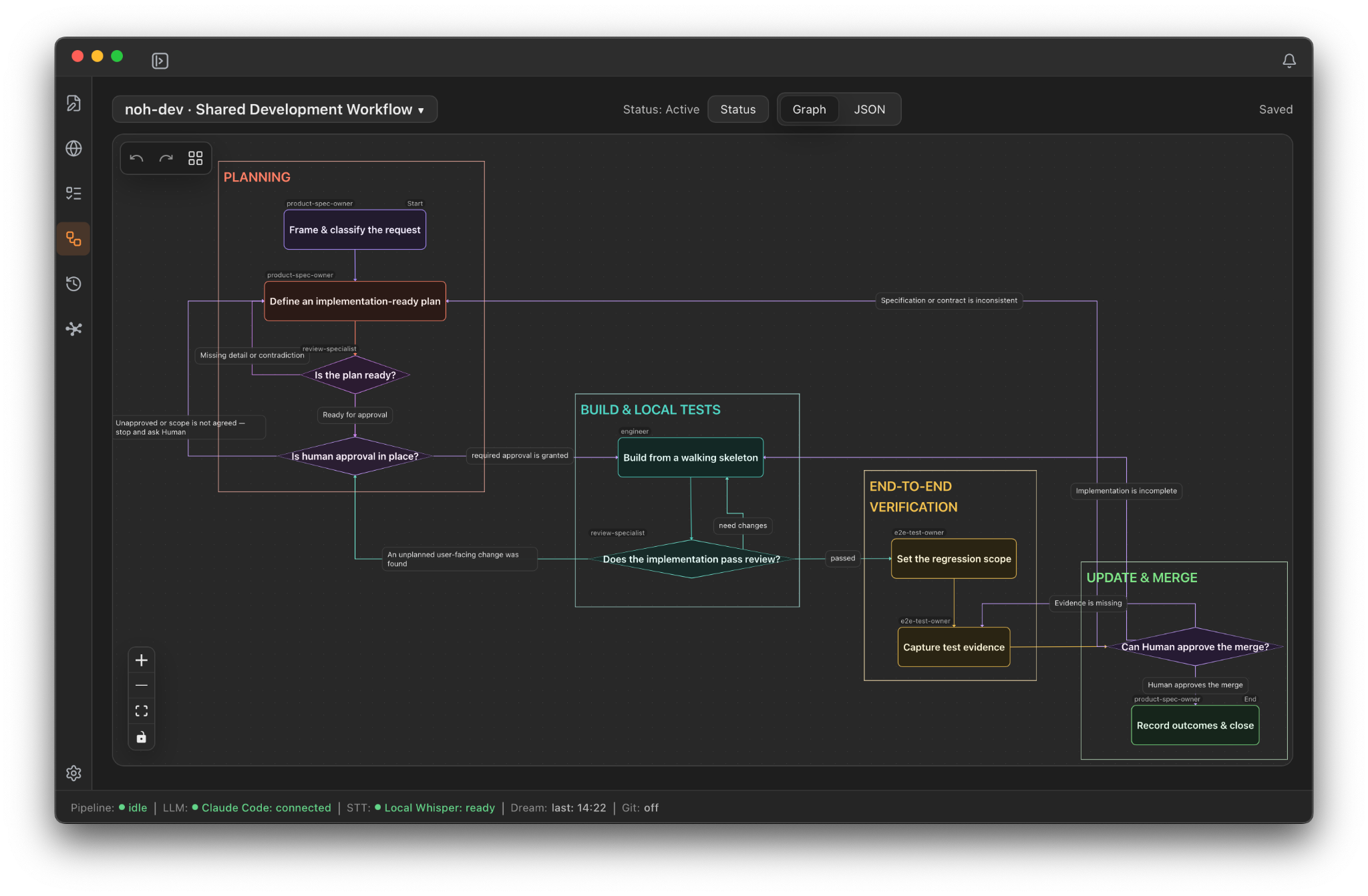
Our actual development workflow, “noh-dev” · Click to view at full size
Planning and reviewing the plan are separate steps, each with a different role (Persona).
Return to a person when the work may exceed its scope or a decision on direction is needed.
Add any new checks to the Procedure, so the next task follows the revised steps.
About 52 seconds of the app in use, without audio, showing how work moves forward by connecting memories.
Alongside the process itself, nohmitaina treats background knowledge, past decisions, remaining work, and previous results as memories with different roles.
Keep the ideas your work rests on: direction, terminology, background, and the reasons behind your choices.
Keep the order of steps, each step’s role, the information it needs, its checks, and the points where decisions lead down different paths.
Connect current work to the Concepts, Procedures, Episodes, and notes it needs.
Record what you did, why you did it, the result, what you noticed, and the Procedure you used.
A Persona is not a type of memory. It is a set of role instructions that establishes the perspective to take when reading shared material and what to check.
Start with something you’ve done many times and find yourself reconsidering each time.
Define the question, gather material, compare options, have a person choose the direction, then write it up. Keep the reasons for the decision in a Concept.
Turn source requirements, review criteria, the point where you decide on a structure, and checks before publication into a Procedure.
Turn weekly reviews, meeting preparation, or release work into steps someone else can follow when responsibilities change.
Draft a Procedure with AI, and define decisions you don’t want to delegate as steps for a person to review.
Choose your display language and workspace, then select Claude Code or Codex CLI under “Agent CLI” in Settings.
Pick work you repeat and draft a Procedure with its steps, roles, materials, checks, and outputs.
Add missing steps or revise their order. Define decisions you don’t want to delegate as steps for a person to review.
When you’re done, review the result and what you noticed, then revise the Procedure for the next run.
nohmitaina is free to use and supports macOS and Windows. You need an environment where Claude Code or Codex CLI is available. Each service’s subscription, usage limits, and API fees are subject to that service’s terms.
Start by making the steps of one familiar task a language you share with AI.
v0.3.0 · Use with Claude Code or Codex CLI
09Releases
| Version | Date | Highlights |
|---|---|---|
| 0.3.0 | 2026-10-01 | Adds Tasks, Personas, Procedures, and Episodes, with improved editing and navigation. |
| 0.2.1 | 2026-08-14 | Adds Windows support, native menus, inline editing in Summon, and a startup guide in four languages. Improves editing and navigation responsiveness, makes saving notes and quitting the app safer, and improves the reliability of LLM settings. |
| 0.2.0 | 2026-06-25 | The noh agent CLI: AI assistants can read and write your noh. Activation visualizations (sparkline and barometer) and stability fixes. |
| 0.1.7 | 2026-06-12 | Link cards resolve their titles automatically. Hardened security (CSP, SSRF guard on URL clips) and third-party notices. Editor sync and June usability fixes. |
| 0.1.6 | 2026-05-20 | Editor document tabs with macOS titlebar integration. Local Whisper model settings. |
| 0.1.5 | 2026-05-18 | Manual Recall from selected text. Rectangular selection and macro record/replay. Markdown rendering fixes. More resilient Dream processing. |
| 0.1.4 | 2026-05-11 | Multi-workspace activation. Startup catch-up for missed Dream runs. Scoring and Core refinements. |