Repeating instructions and corrections every time
You explain the required references, caveats, and output format again. If a correction stays in that one conversation, you will repeat it on the next task.
Organize the knowledge, methods, and history behind your work, so you and AI can work from the same context. nohmitaina (noh for short) gives you a way to delegate work to AI without relying solely on instructions for each task.
Work with AI agents on macOS and Windows
Organize tasks, knowledge, and procedures in noh so AI can refer to what you have organized. An LP update shows the flow from preparation and execution to reviewing the results.
Music: Inspired by Kevin MacLeod, CC BY 4.0. Edited and mixed with narration. Full credit.
Optional captions appear below the video in five languages. The final Episode was recorded separately from the preceding CLI run.
You keep giving instructions and checking the work to get closer to the result you want. What is missing is not a better prompt, but a way to keep sharing the context and methods behind your work.
You explain the required references, caveats, and output format again. If a correction stays in that one conversation, you will repeat it on the next task.
You have to design the steps, roles, decisions, inputs, outputs, and constraints yourself, then maintain them as AI and your work change.
Even when you save knowledge and procedures, unclear relationships make it time-consuming to check what to reference and where to make changes.
What do we mean by “the work itself”? Let’s take a landing page update as an example.
In noh, work is organized in an Area (noh) hierarchy. Here, “Product → Marketing → Landing page update (example)” shows how work in a selected Area is organized into four memory types.
Organize the guidelines, background, and reasoning you repeatedly refer to when updating a landing page in a tree.
For each step, organize who checks what and where a person makes the decision.
Manage current work and link it to the Concept and Procedure it needs.
Example: Add information next to the document request button explaining how to receive the document and what happens after requesting itRecord actions, results, and observations to improve your knowledge and methods for next time.
Example: A pre-publication review revealed that it was unclear how to receive the document. We added the steps after a request and included this in the next review checklistThis role handles steps in the landing page update. It defines what to check from a marketing perspective at each step of the Procedure.
Here is how noh changes the burdens in A–C.
Organize knowledge in a Concept tree and reference what you need from a Task. Feed earlier observations from Episode back into your knowledge and methods so the next Task can reference them too.
Reference only the knowledge this task needs.
Target audienceValue to communicateWriting conventionsProcedure provides a structure and UI for organizing steps, Persona, references, inputs, outputs, and checks. It reduces the effort of designing the fields and their presentation from scratch. See AI-handled steps and human decisions in one flow, and revise only the steps that need it.
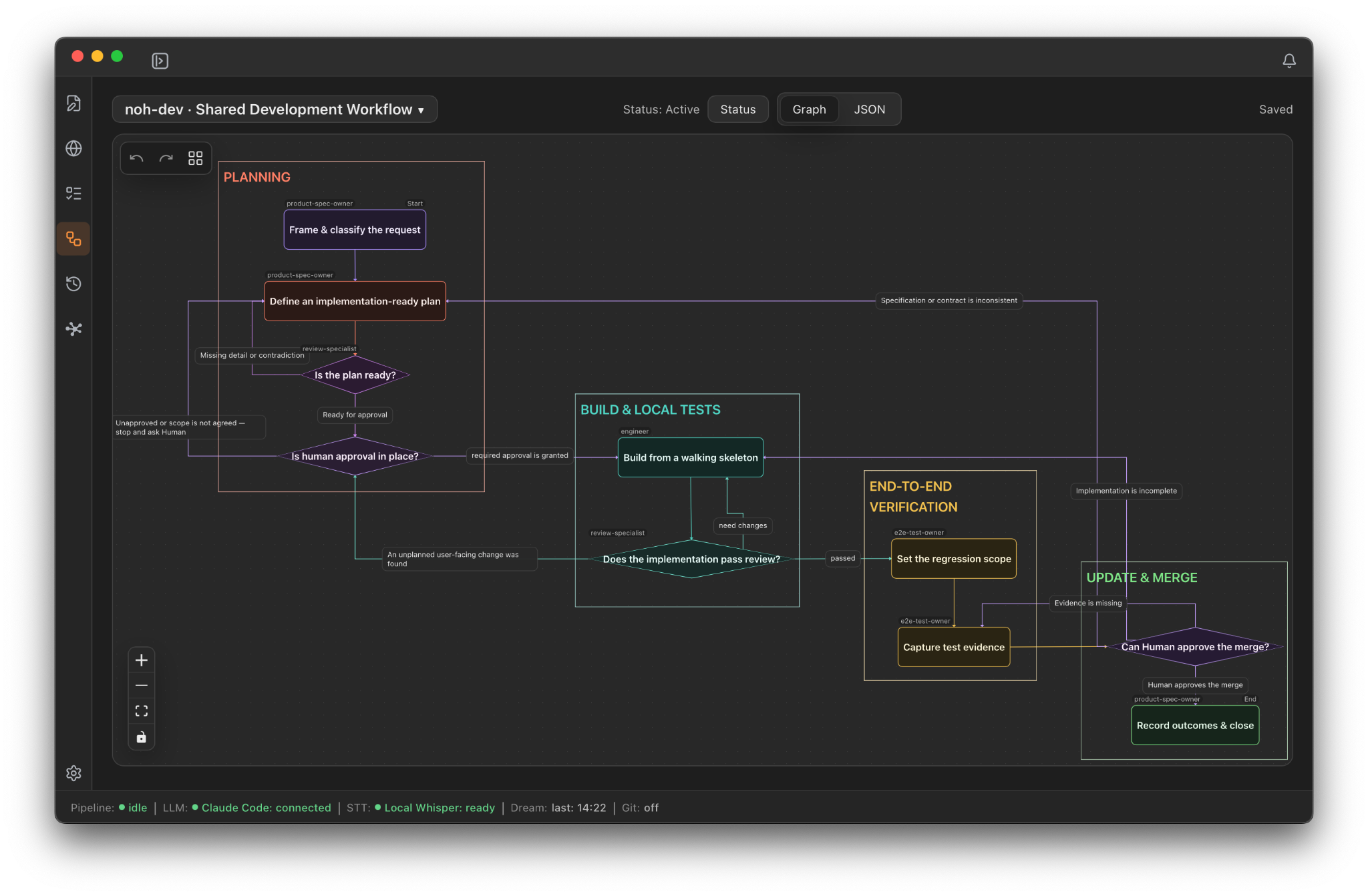
This demo illustrates the interaction and differs from the actual app screen. It reproduces the ten stages of the screenshot version of noh-dev using fixed data, with shortened details. Added examples are marked “Sample”. Editing, saving and running tools are not available.
The interactive demo on this page works on desktop computers only.
Separate work into Areas and review the relationships between knowledge in the Concept tree. Procedure shows both the overall flow and the roles, inputs, and outputs of a selected step. Save current results and observations in Episode and connect them to the knowledge or steps to review next.
Decide the structure → Write the copy → Review the wording → Publish
Selected step: Review Persona, references, inputs, and outputs
Replaced the Area explanation with a concrete example. Refer to the same writing conventions in the next landing page update.
Tell area-advisor about your goals and everyday work, review its suggested Area hierarchy, and choose one Area to start with.
AI agents read and write information through noh CLI. They need an environment that can run noh CLI and access the storage location. For Claude Code and Codex, noh provides a way to install a Skill that explains how to use it.
area-advisor is included when a new workspace is created. Updating the app does not add it to existing workspaces, including those created in 0.4.0 or earlier. If needed, use the English Persona text below.
Read area-advisor (full English text)
noh is free. Depending on the AI service you use, separate charges may apply.
Bring your tasks, methods, knowledge, and results into one shared memory for you and AI. Help us improve noh: tell us about the work you want to tackle and what you notice when using it.
AI models will continue to evolve. To put their capabilities to use in real work, you need to be able to share your knowledge, methods, and expected outcomes with AI.
That is what we are building with noh. Organize tasks, methods, related knowledge, and results so you can understand and review the work while delegating it to AI.
To make AI truly useful at work, we promise to keep working in this field and improving noh.
Choose a download09Releases
| Version | Date | Highlights |
|---|---|---|
| 0.4.1 | 2026-11-15 | Adds Today boards and Task groups, inherited Task status labels for Areas, and improvements to memory links, reference notes, and Persona management. Improves the Agent CLI, imports, and desktop reliability. |
| 0.4.0 | 2026-10-24 | Adds Areas for organizing memories and improves Concept editing. Notes now default to Memo (save only) and inherit workspace and folder settings. Fixes Windows upgrade backups and startup. |
| 0.3.0 | 2026-10-01 | Adds Tasks, Personas, Procedures, and Episodes, with improved editing and navigation. |
| 0.2.1 | 2026-08-14 | Adds Windows support, native menus, inline editing in Summon, and a startup guide in four languages. Improves editing and navigation responsiveness, makes saving notes and quitting the app safer, and improves the reliability of LLM settings. |
| 0.2.0 | 2026-06-25 | The noh agent CLI: AI assistants can read and write your noh. Activation visualizations (sparkline and barometer) and stability fixes. |
| 0.1.7 | 2026-06-12 | Link cards resolve their titles automatically. Hardened security (CSP, SSRF guard on URL clips) and third-party notices. Editor sync and June usability fixes. |
| 0.1.6 | 2026-05-20 | Editor document tabs with macOS titlebar integration. Local Whisper model settings. |
| 0.1.5 | 2026-05-18 | Manual Recall from selected text. Rectangular selection and macro record/replay. Markdown rendering fixes. More resilient Dream processing. |
| 0.1.4 | 2026-05-11 | Multi-workspace activation. Startup catch-up for missed Dream runs. Scoring and Core refinements. |