nohmitaina · 脳みたいな

An editor for thinkers —
your brain, your base.

Write the way you always write. nohmitaina reads what you’ve written, finds the concepts you’ve been turning over — recently and across the months — and gives them shape before they slip away.

Like a second brain, quietly at work.

Download for macOSFree · Apple Silicon · 11 MBSee how it thinks ↓

You keep writing. Nothing stays.

01

You can’t remember what last week’s you was thinking.

Morning journals. Article notes that trailed off mid-sentence. That friction you felt in a meeting. In the moment, every line mattered. A week later, none of it connects to anything inside you. The fact of having written remains. The substance is gone.

02

What have you been turning over, lately?

An ordinary notes app lets you search, re-read, retrace. That isn’t enough. Search returns lines. Not themes. What you actually want is the theme your mind keeps circling back to — and a keyword can’t pull that out.

03

Every conversation with your AI starts at hello.

ChatGPT, Claude, all of them. Who you are, what you care about, what you decided last week — you explain it again every time, or it’s simply not there. If your AI already knew you, the first line of the conversation would change.

We believe a tool can think with you — but only if it knows when to forget.

The brain doesn’t store everything. It is the act of forgetting that lets the important things rise. nohmitaina ports that mechanism into an editor.

When you write, an AI extracts concepts, draws links, scores them, and lets the scores decay over time. What matters keeps surfacing. The rest dims.

This is not an editor for searching. It is an editor for remembering.

RawWhat you wrote, said, clipped — Markdown on disk.
WikiConcept pages, auto-generated, auto-linked, scored.
SchemaUser-defined rules and facets that shape what the model extracts.
Core+1 layerYour current core concepts, plus nearby wiki context, assembled for conversation.
Four moments. One mind.

iMorning · write

Just write. The structure happens later.

A Markdown editor that takes itself seriously. Tables, math, Mermaid, code blocks, link cards — the writing tool you would have built for yourself. Voice in, transcribed by Whisper. No taxonomy to maintain. No filing system to design. You write.

  • Voice to Markdown via Whisper
  • MemoOnly mode for the private things
  • Markdown on your disk, always
iiNight · dream

While you sleep, your notes become a wiki.

nohmitaina has a thing called Dream. On a quiet schedule, it extracts concepts from what you wrote, drafts wiki pages, draws links between them, and re-scores everything. You wake up to a notebook that grew without you.

  • Your data lives locally — use Claude Code, the Codex CLI, or your configured API provider
  • Notes and wiki pages are plain Markdown, readable in any editor or IDE
  • Surprise score lifts what is genuinely new
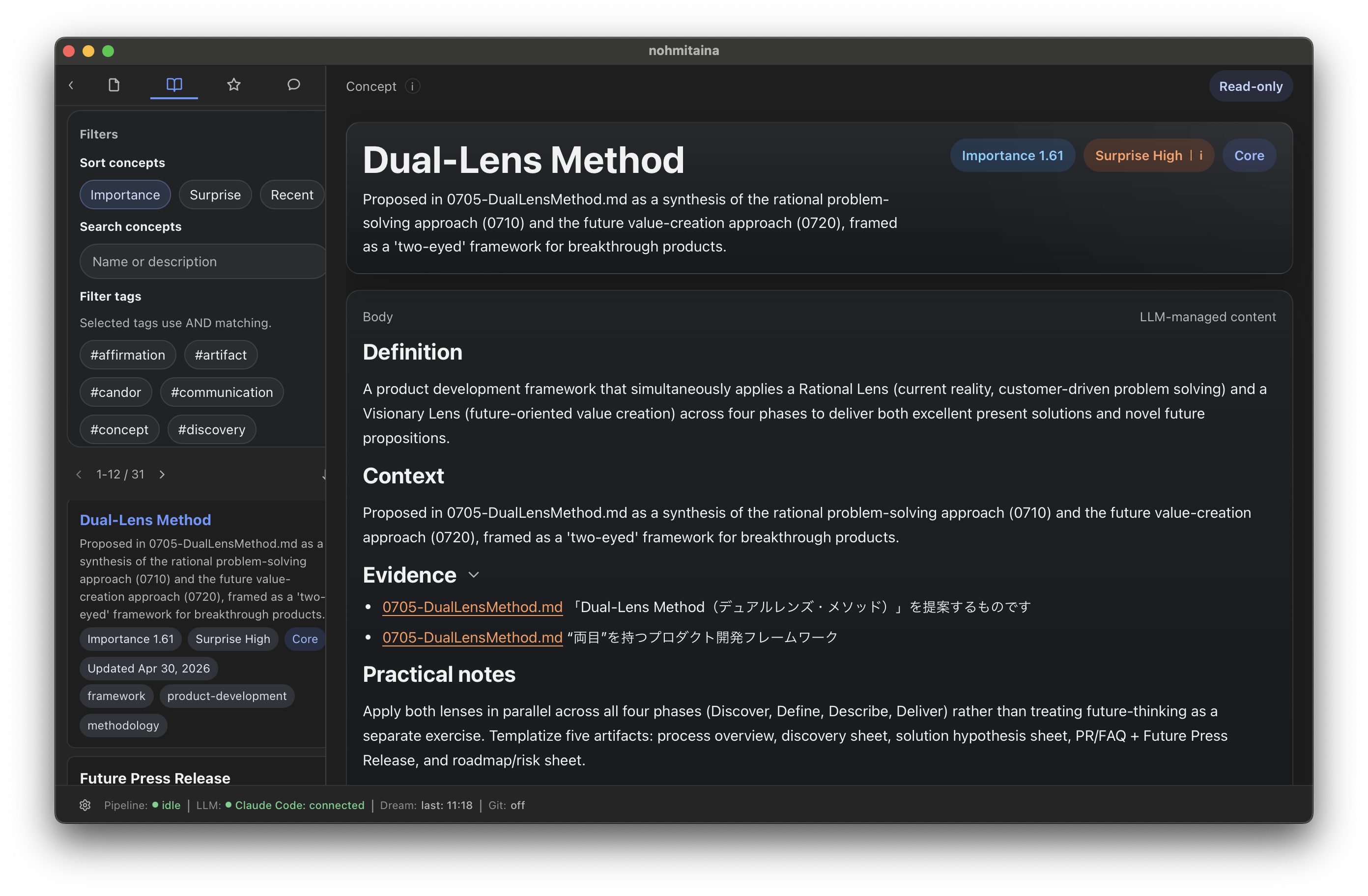
A wiki concept page for the Dual-Lens Method, surfaced into Core after a Dream cycle.
Wiki · Dual-Lens Method · importance 1.61, surprise high
iiiAnytime · talk

Your AI starts every conversation knowing you.

Open dialogue. Your Core concepts are already in context. The model can search the rest of your wiki when it needs to. The first line of the conversation isn’t “hello.” It is what you were thinking about yesterday.

  • The AI knows where you are in your thinking — it carries your context, so you don’t have to
  • Every 10 turns, the dialogue itself becomes part of the wiki
  • No more starting at hello
ivSometimes · look back

Your thinking, laid out in front of you.

The concepts you’ve been turning over are already organized. Just open them. The themes, the connections, the surprises. You see yourself thinking — and you understand yourself better than you did this morning.

  • Themes surface on their own
  • Connections between concepts, drawn like a map
  • The high-surprise findings, easy to spot

This is what your day could look like.

Download for macOS

Built on how memory actually works.

Pillar I

The two-strength model

Retrieval strength (how easy it is to recall right now) and storage strength (how deeply it has stuck). A concept can fade from your Core and still live in the deep layers, ready to come back when something connects.

after Robert A. Bjork

Pillar II

ACT-R base-level activation

Every reference, every revisit, contributes to recall — and decays with time. The Practice Effect and the Spacing Effect, expressed in a single elegant expression.

B(t) = ln(Σ tᵢ⁻ᵈ)

Anderson & Lebiere, 1998 · d = 0.5

Pillar III

Surprise as a signal

Each new concept is checked against everything you already think. If it brings a genuinely new angle, it surfaces. If not, it stays quiet. The longer you write, the more clearly the unfamiliar speaks.

internal: high · medium · low

+1 layer

Andrej Karpathy described an LLM-wiki in three layers — Raw, Wiki, Schema. We added one. Core: the compressed self the model is always allowed to see. Without it, your wiki keeps growing and the AI never quite catches up.

We made decisions by subtraction.

An all-in-one workspace.

This is not a place to manage tasks, run a CRM, or share docs with a team. It is an editor for one person’s thinking.

A bidirectional linking tool.

You don’t draw the [[brackets]]. The AI finds the concept, makes the page, draws the link. Your job is to write.

A daily-journal app.

No “one page per day” format. Write in the shape that fits your thought. The structure is added later, by the system.

A cloud service.

Your data lives on your disk. As Markdown. We don’t hold it. We don’t need to.

Free, forever, for the things that matter.

Free

Editor

$0 / forever

The full editor. The full loop. Use Claude Code, the Codex CLI, or bring your own API key.

  • Full Markdown editor
  • Concept extraction & wiki generation
  • Core view, Index, dialogue
  • Local files, URL clips, file imports
  • Voice journaling (your Whisper key)
Download for macOS
Coming soon

Add-on

Sync

$5 / month

Keep your wiki in step across the devices you actually think on.

  • End-to-end sync of notes, wiki, and Core
  • Mobile read access (write coming later)
  • WatchedFile sync from Drive, Slack, Notion
  • Encrypted at rest, encrypted in transit
In preparation
Coming soon

Add-on

Publish

$10 / month

Choose the wiki pages you want to share with the world. Keep the rest yours.

  • Per-page publish control
  • Hosted at your own subdomain
  • Quiet typography, no ads, no tracking
  • Update once, the published page follows
In preparation

Launch

We are also live on Product Hunt.

If you want the launch page, comments, and a simple way to share it, here is the Product Hunt card.

nohmitaina

nohmitaina

Editor for thinkers — your past returns when you write

Check it out on Product Hunt

I built this because I needed it.

I journal in the morning. Some days I just talk into the mic and let it run. The writing was never the problem. The problem was that a week later, none of it was still alive in my head.

I tried Obsidian. I tried Reflect. They are good in the way that good tools are good. What I wanted was different: a place where the part of me that is currently thinking would stay visible. A place where I could decide how much of myself the AI was allowed to keep.

nohmitaina is the editor I am building for myself. I use it every day. If any of this resonates, this is for you.

simochan· Tokyo, 2026

Want to talk to me directly? Come over to Discord.Join the Discord →

If this is your problem too.

Download for macOS

Things people ask before they download.

Where is my data stored?

On your disk, as Markdown. nohmitaina does not push your notes to the cloud. API calls send only the text the model needs to do the work. Sync (when it ships) is opt-in and end-to-end encrypted.

Can I bring my Obsidian vault?

Drop your existing folder into notes/ and nohmitaina starts ingesting from there. Markdown stays Markdown — your other editors and IDEs keep working.

I don’t have an API key.

Run nohmitaina through Claude Code or the Codex CLI — no billable API key needed. When you want more control, bring your own provider key.

Windows or Linux?

macOS first. Other platforms are technically possible — we ship to them when there is real demand.

Mobile?

Mobile read access is planned as part of Sync. Write on mobile comes after.

Is my data used to train models?

No. Anthropic and OpenAI API policies do not train on API content. Your text is not training data. For the latest details, please refer to each provider’s own policy.

What shipped, and when.

VersionDateHighlights
0.1.62026-05-20Editor document tabs with macOS titlebar integration. Local Whisper model settings.
0.1.52026-05-18Manual Recall from selected text. Rectangular selection and macro record/replay. Markdown rendering fixes. More resilient Dream processing.
0.1.42026-05-11Multi-workspace activation. Startup catch-up for missed Dream runs. Scoring and Core refinements.